Wazuh System Inventory: Services, Ports, and Protocols

In cybersecurity, the single biggest blind spot is often the lack of comprehensive endpoint visibility. You can deploy the most advanced firewalls and anti-malware solutions, but if you don’t know exactly what is running on every machine in your environment, you are inherently vulnerable. This blind spot gives rise to dangerous situations, such as:
- Forgotten Services: An old test server or a deprecated application that was never fully decommissioned, leaving an exposed entry point.
- Unauthorized Open Ports: A developer momentarily opens a high-risk port (like RDP or Telnet) for troubleshooting and forgets to close it, creating an accidental backdoor.
- Shadow IT: Unknown processes or services running outside of management oversight.
These hidden elements represent a massive and often unnecessary attack surface just waiting to be exploited.
Wazuh effectively eliminates these blind spots through its powerful System Inventory capability. This feature is driven by the Syscollector module integrated directly into the lightweight Wazuh agent, turning every monitored endpoint into an active information source.
Hi, I’m Ismail — CEO of Cyberkarta, one of the fastest-growing cybersecurity companies in Indonesia. If you have ideas, insights, or challenges in cybersecurity that you’d like to explore together, feel free to reach out through the comments or connect with me on LinkedIn. I’d love to hear from you and collaborate on building a safer and more resilient digital ecosystem.
- LinkedIn Profile — https://www.linkedin.com/in/ismail-hakim/
- Company Website — https://cyberkarta.com
- Wazuh Ambassador Profile — https://wazuh.com/ambassadors/ismail-hakim/
What Readers Will Learn
This article will guide you through the process of establishing complete endpoint visibility using Wazuh’s Syscollector. By the end of this read, you will understand:
- How to leverage Wazuh to automatically map Services and running processes.
- The mechanics of capturing active Ports (listening and established) and their associated Protocols (TCP/UDP).
- The direct security value of this inventory data, turning passive asset lists into an active defense tool for threat hunting and vulnerability detection.
System Inventory: Pillars of Visibility
In a security context, System Inventory refers to the ongoing process of collecting and maintaining a real-time, comprehensive record of all software, hardware, and network configurations across an endpoint. This turns a dispersed set of assets into a structured and transparent environment, providing the foundational data required to accurately assess risk. In Wazuh, system inventory can be enriched through multiple detection sources, including Hardware, OS details, Installed Packages, Open Ports, Running Processes, Windows Updates, Users, Groups, Services, and Browser Extensions. For this blog post, however, we will focus specifically on the three primary pillars of detection.

First Pillar: Services (Identifying the Living Applications)
A Service (or daemon on Linux/macOS) represents the fundamental background work being performed on a machine. From a security perspective, every running service is a potential point of compromise if it is outdated, misconfigured, or unnecessary.
- Goal: Identifying every running process and service (e.g., Apache, Nginx, SSH daemon).
- Security Value: You can quickly identify unapproved or forgotten services that consume resources and pose a risk, such as an old FTP server or an unauthorized remote desktop utility.
Second Pillar: Ports (Mapping the Entryways)
Ports are the communication endpoints that allow services to send and receive data over the network. The state of an endpoint’s open ports is the single best indicator of its network attack surface.
- Goal: Mapping every open port and its critical status.
- Security Value: This allows you to immediately spot unnecessary LISTENING ports, which are potential vulnerabilities, and trace unauthorized ESTABLISHED connections that might indicate compromise or data exfiltration
Third Pillar: Protocols (Defining the Communication Language)
Every network communication relies on a defined Protocol. Understanding the protocol associated with an open port is crucial for determining its risk level and the nature of the data being transmitted.
- Goal: Determining the associated network protocol for each connection.
- Security Value: Knowing the protocol helps in defining appropriate network segmentation and security policies (e.g., ensuring a critical service only communicates via secured TCP connections).
Wazuh Syscollector Module
The foundation of Wazuh’s data collection is the Wazuh Agent. This small piece of software is installed directly on every endpoint you wish to monitor (whether it’s Windows, Linux, or macOS).
By running locally, the agent has the necessary permissions and access to query the operating system’s kernel, file system, and network stack. This ensures the collected data on services, ports, and protocols is accurate and real-time, not relying on external network scanning which can miss internal details.
The Syscollector module is an integral part of the Wazuh Agent, dedicated solely to gathering system inventory:
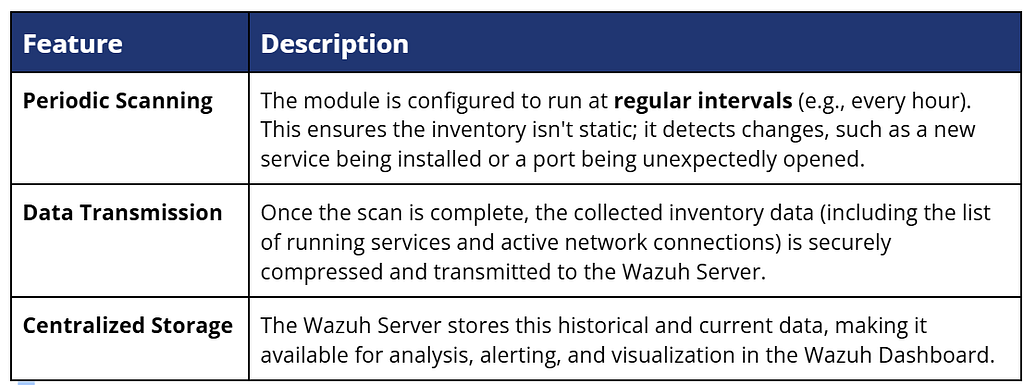
Enabling the core services, ports, and protocols inventory is remarkably straightforward (and it is enabled by default). It only requires adding a simple configuration block to the agent’s main configuration file (ossec.conf). You can find the Syscollector configuration in the Wazuh Agent configuration file at:
- /var/ossec/etc/ossec.conf for Linux endpoints.
- C:\Program Files (x86)\ossec-agent\ossec.conf for Windows endpoints.
- /Library/Ossec/ossec.conf for macOS endpoints.
Wazuh Agent Configuration
<!-- System inventory -->
   <wodle name="syscollector">
     <disabled>no</disabled>
     <interval>1h</interval>
     <scan_on_start>yes</scan_on_start>
     <hardware>yes</hardware>
     <os>yes</os>
     <network>yes</network>
     <packages>yes</packages>
     <ports all="no">yes</ports>
     <processes>yes</processes>
     <users>yes</users>
     <groups>yes</groups>
     <services>yes</services>
     <browser_extensions>yes</browser_extensions>

     <!-- Database synchronization settings -->
     <synchronization>
       <max_eps>10</max_eps>
     </synchronization>
   </wodle>
Potential Configuration
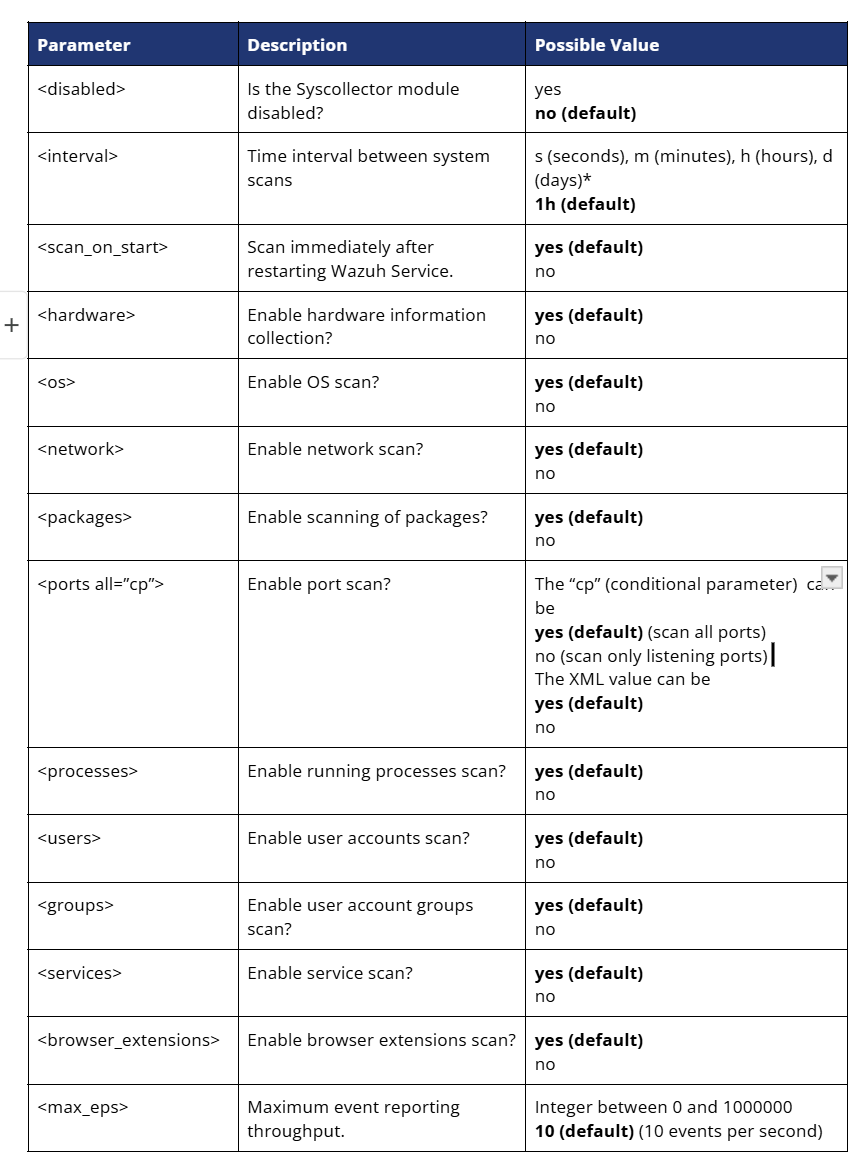
‘* Positive values that contain suffix characters indicating a time unit, e.g. 1s (1 second) or 3h (3 hours), etc.
System inventory is a must-have functionality during day-to-day Security Operation Center (SOC). It is enabled by default in Wazuh, and gives us the capability to detect anomalies and a starting point for vulnerability detection and threat hunting.
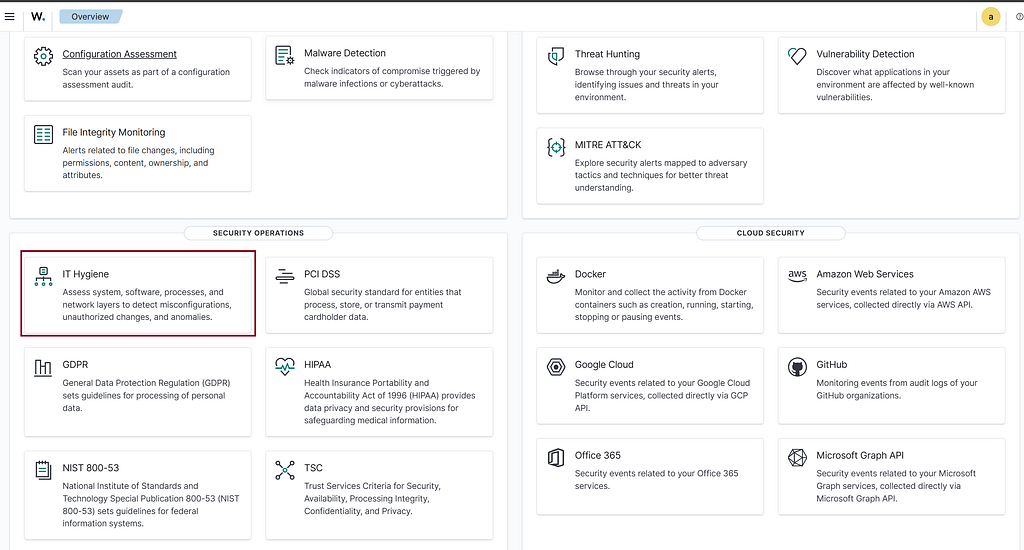
System Inventory into Threat Hunting
The true power of Wazuh’s System Inventory is realized when you move beyond compliance checks and use the data for proactive threat hunting. Threat hunting is a defensive discipline where security analysts actively and iteratively search through network and endpoint data to detect and isolate advanced threats that have evaded existing security controls. System inventory data is the ideal starting point for this hunt. By maintaining a clean, up-to-date baseline of every authorized service, every approved port, and every legitimate protocol across your endpoints, any deviation immediately becomes a high-priority anomaly. When a hidden process starts, or an unauthorized port opens, the Syscollector data acts as your forensic foundation, allowing you to quickly isolate the system, investigate the change, and eliminate the potential threat before it escalates into a full breach.
A. Hunting Malicious Processes and Persistence
The Top running processes list is crucial for detecting malware and unauthorized persistence mechanisms, as attackers often disguise malicious services to blend in.
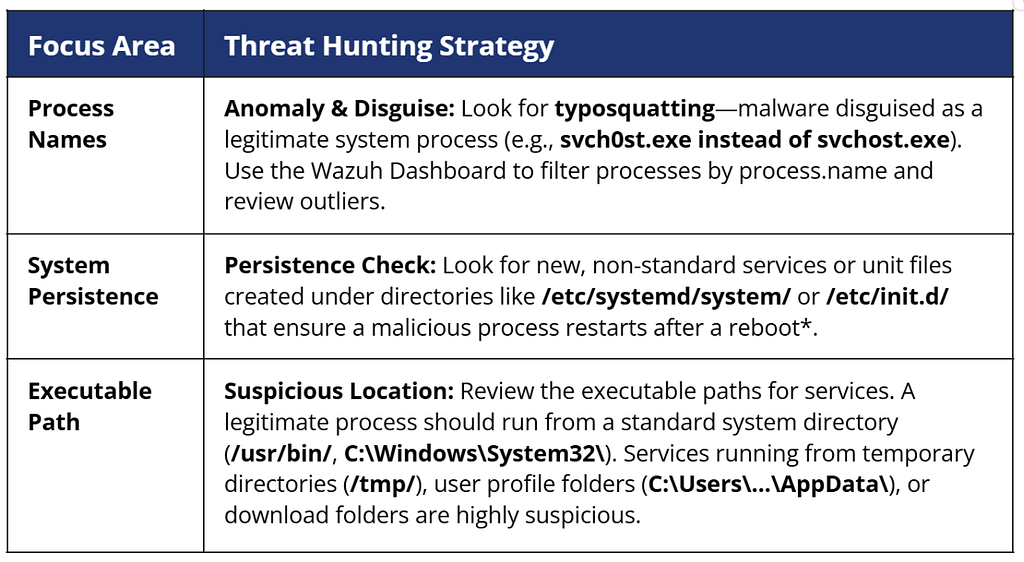
‘* It is recommended to use Wazuh’s File Integrity Monitoring (FIM) on these directories (https://cyberkarta.com/blog/Defending-Against-Threat-Actors-Persistence-Through-File-Integrity-Monitoring-FIM-in-Wazuh-0aba8db8574e)
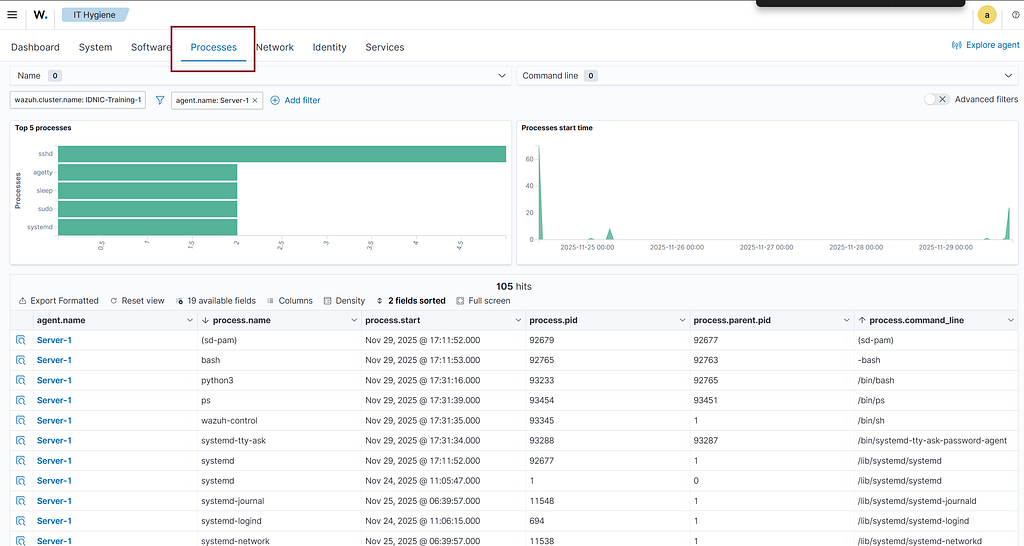
Initial threat hunting for detecting potential persistence mechanisms can begin in the Processes tab of Wazuh’s IT Hygiene module. The Top 5 Processes bar chart and the Process Start Time graph provide an immediate overview of the most active processes and when they were launched. Below these visualizations, the detailed process table offers full visibility into each process, including its name, PID, parent PID, and command line. This information allows analysts to spot unusual activity and identify potential anomalies.
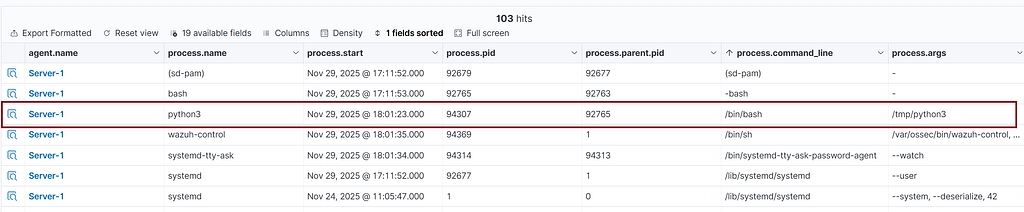
When conducting threat hunting, we have the flexibility to create a new column based on the specific information required. The process.args field provides valuable data for identifying suspicious processes.

The following image displays “Python3”, a widely-used programming language. The question remains: is the presence of this process in our system suspicious?
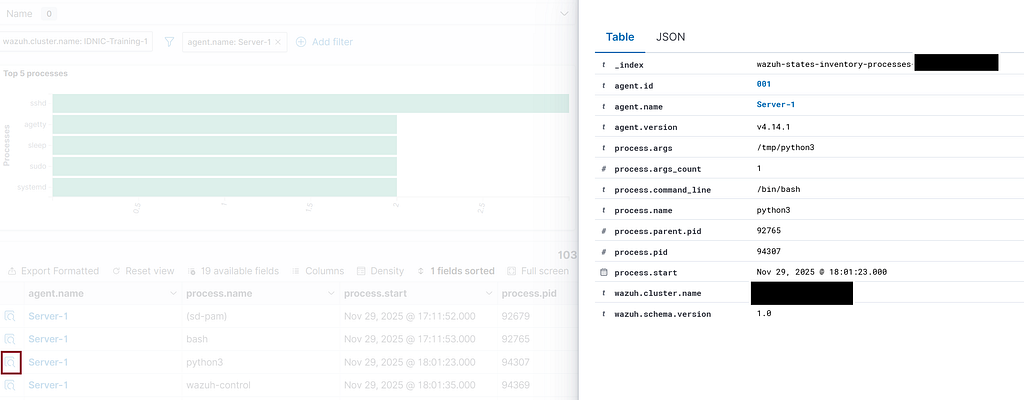
If an entry in the database catches your attention, click the Inspect details button. This action provides more information about the attack, such as the crucial process.pid and process.parent.pid which are valuable for deeper investigation.
B. Hunting Unauthorized Ports and Backdoors
The Ports inventory reveals your attack surface and is the fastest way to detect a potential backdoor — a hidden entry point for remote access.
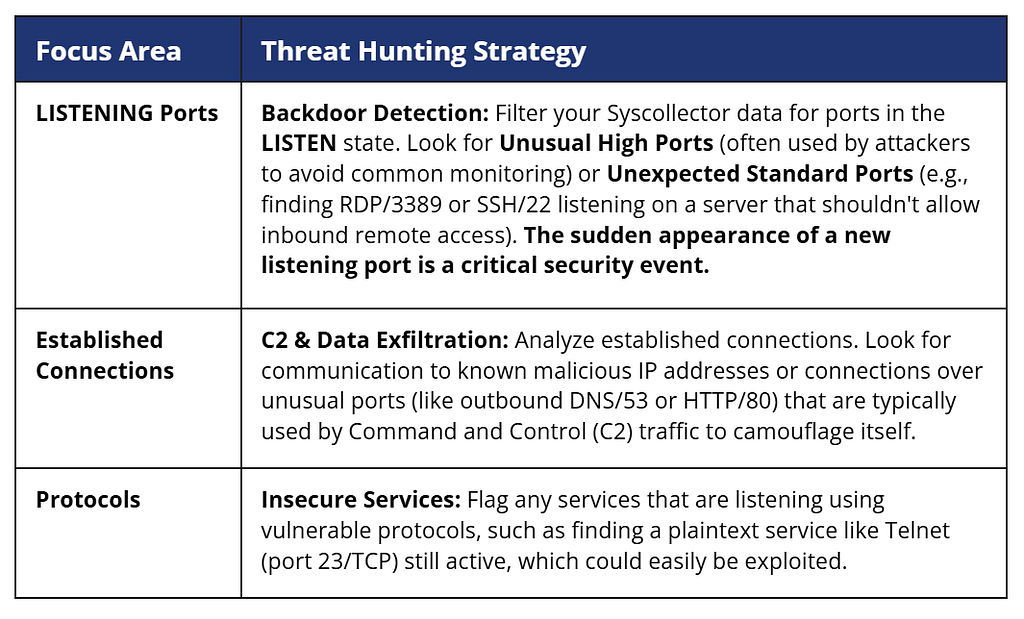
A critical aspect of detecting network anomalies involves establishing a prior baseline of which ports are typically open.
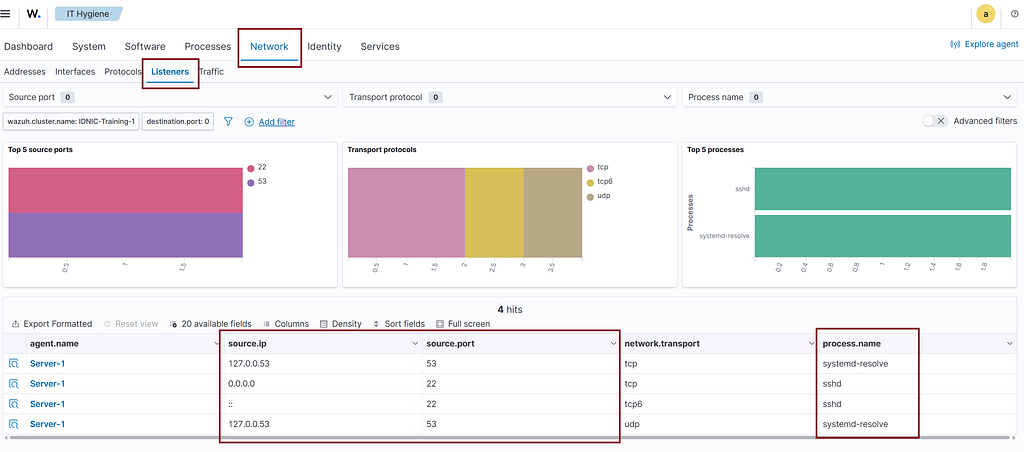
An open port, as illustrated in the image below, represents an anomaly of the established baseline and serves as a starting point for immediate investigation.

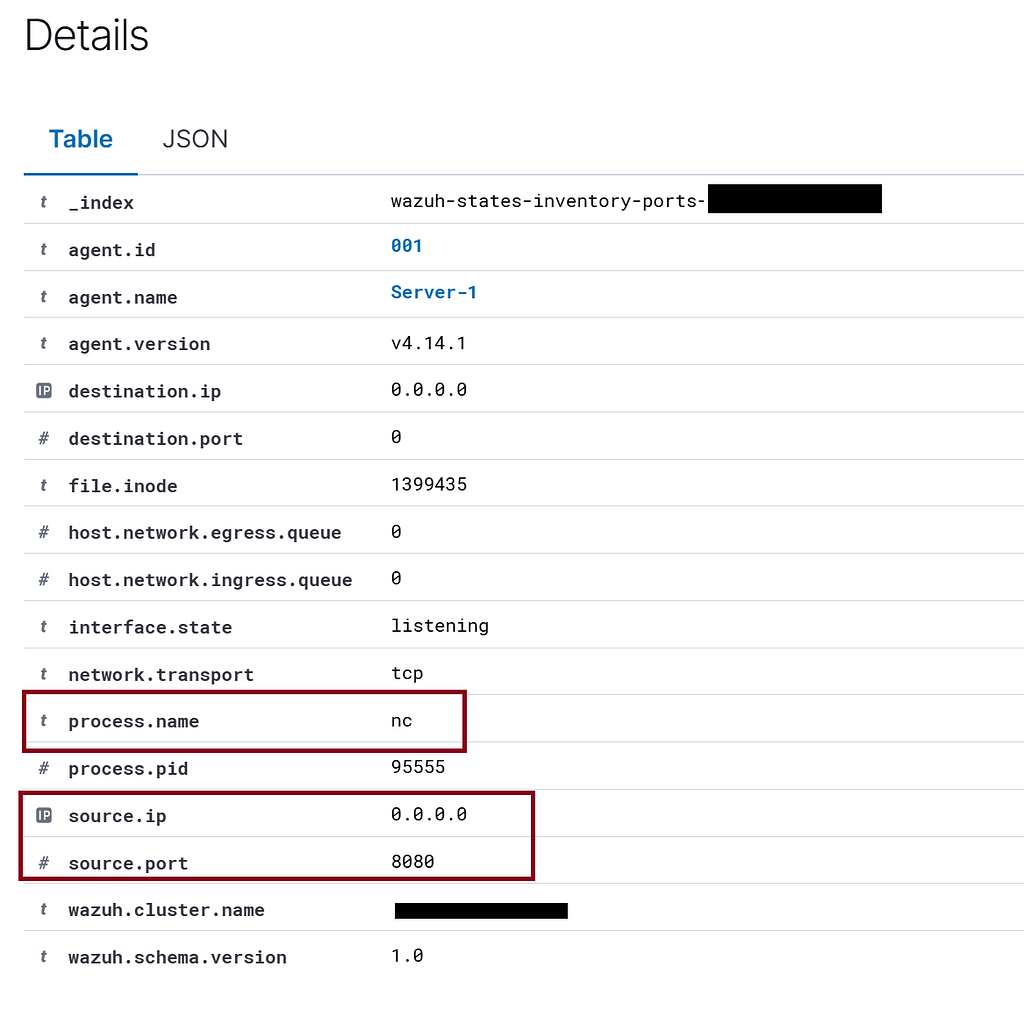
Detailed information about the anomaly is always available via the Inspect details button. Wazuh identifies the process name as nc, which stands for netcat. Netcat is a well-known tool often implicated in Command and Control (C2) scenarios for opening ports and establishing system backdoors, such as a reverse shell.
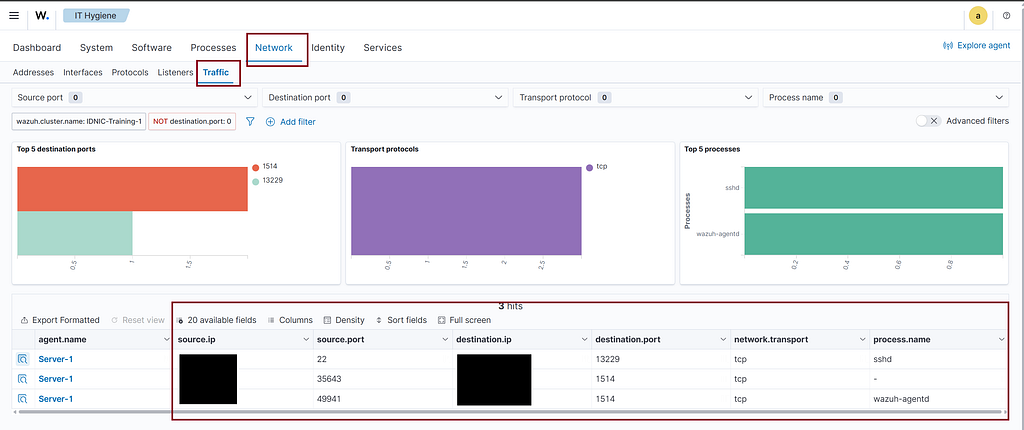
To effectively investigate or initiate threat hunting, begin by reviewing established connections in the Traffic tab. A crucial first step is to establish a Blacklist IP Database, which can then be used to compare and identify suspicious established connections.
System Inventory into Vulnerability Detection
While the primary function of System Inventory is to establish baseline visibility and hunt for real-time threats, its data provides the essential foundation for one of the most critical security tasks: Vulnerability Detection. You can’t patch software you don’t know you have. By meticulously collecting the inventory of all installed packages and operating system versions across every endpoint, the Wazuh Syscollector module provides a comprehensive list of assets. This data is then automatically fed into the Vulnerability Detection module, where it is cross-referenced against global, regularly updated databases of known security flaws (CVEs). This correlation transforms a simple asset list into a prioritized, actionable report, telling you exactly which endpoints are running which vulnerable pieces of software, allowing you to move instantly from discovery to remediation.
The Installed Packages list is the inventory data source for Wazuh’s Vulnerability Detection module, allowing you to proactively hunt for exploitable software.
- Correlation: Wazuh automatically correlates every package name and version with the constantly updated Common Vulnerabilities and Exposures (CVE) databases.
- Action: Regularly review the Vulnerability Detection module. Any package on your endpoint that has a known, high-severity CVE is a high-risk security gap. The inventory data allows you to generate a prioritized list of patches needed to drastically reduce your attack surface.
The system inventory includes a list of all installed packages, detailing information about their respective publishers.
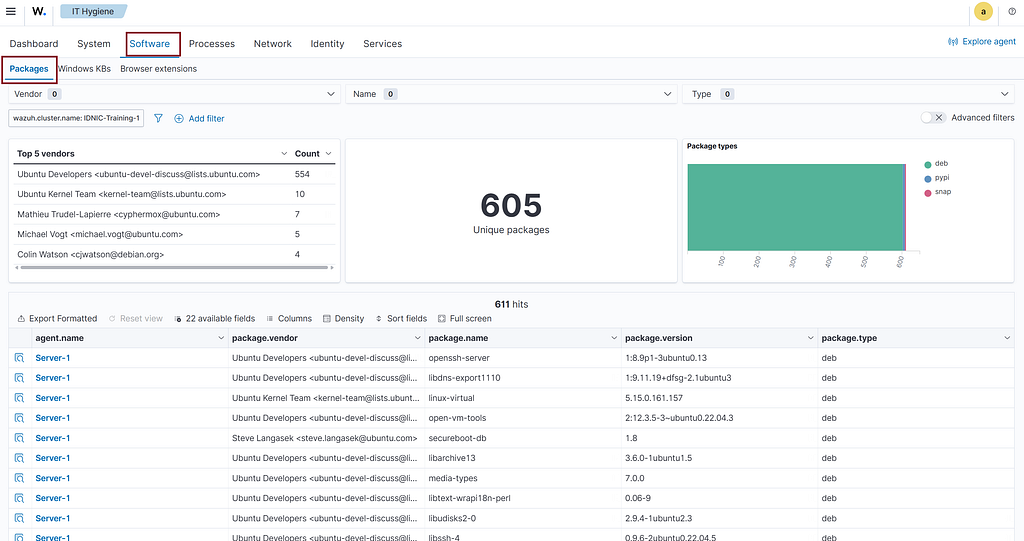
The data collected by the package system inventory is utilized by the Wazuh Vulnerability Detection module.
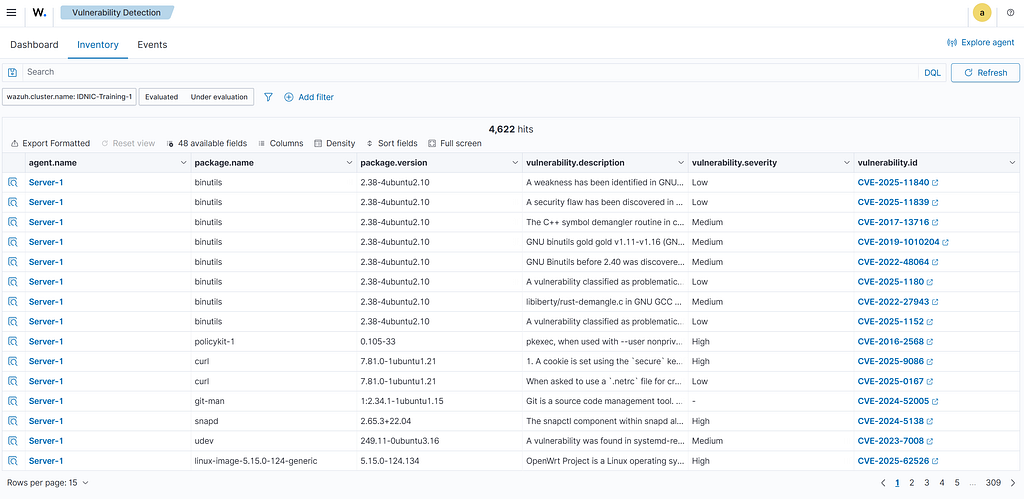
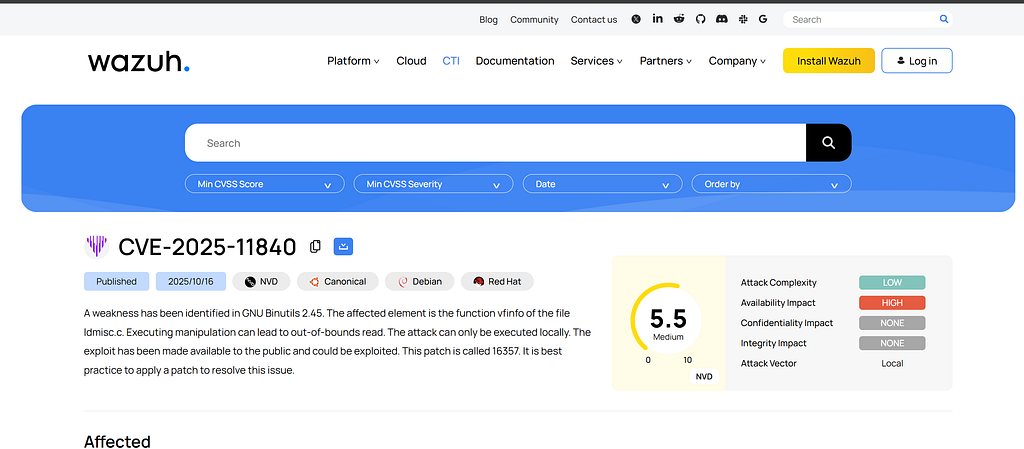
The Vulnerability Module is now an integral part of Wazuh CTI in the latest version of Wazuh. For more information, please visit the Wazuh CTI website: https://cti.wazuh.com.
Closing
By integrating the Syscollector module, Wazuh transforms a static asset list into a dynamic, real-time security ledger. This unparalleled visibility across services, ports, and protocols not only hardens your environment against Shadow IT and misconfigurations but also provides the essential, granular data needed to fuel both proactive Threat Hunting and continuous Vulnerability Detection. Ultimately, Wazuh’s System Inventory moves your security operations from a reactive posture to an informed, active defense, ensuring your team can preemptively address anomalies and security gaps before they result in a compromise.
Source
- System Inventory Configuration (https://documentation.wazuh.com/current/user-manual/capabilities/system-inventory/configuration.html#wazuh-agent-configuration)
- Cyberkarta Blog about FIM (File Integrity Monitoring) in Wazuh (https://cyberkarta.com/blog/Defending-Against-Threat-Actors-Persistence-Through-File-Integrity-Monitoring-FIM-in-Wazuh-0aba8db8574e)
- Wazuh Cyber Threat Intelligence (CTI) (https://cti.wazuh.com)
Wazuh System Inventory: Services, Ports, and Protocols was originally published in Cyberkarta on Medium, where people are continuing the conversation by highlighting and responding to this story.